profile

Met Mkrtchyan

I design digital products that make complex things feel simple.

Book A call

Client For:

Zenlime

Services:

Lead Product Designer · UX/UI

Overview

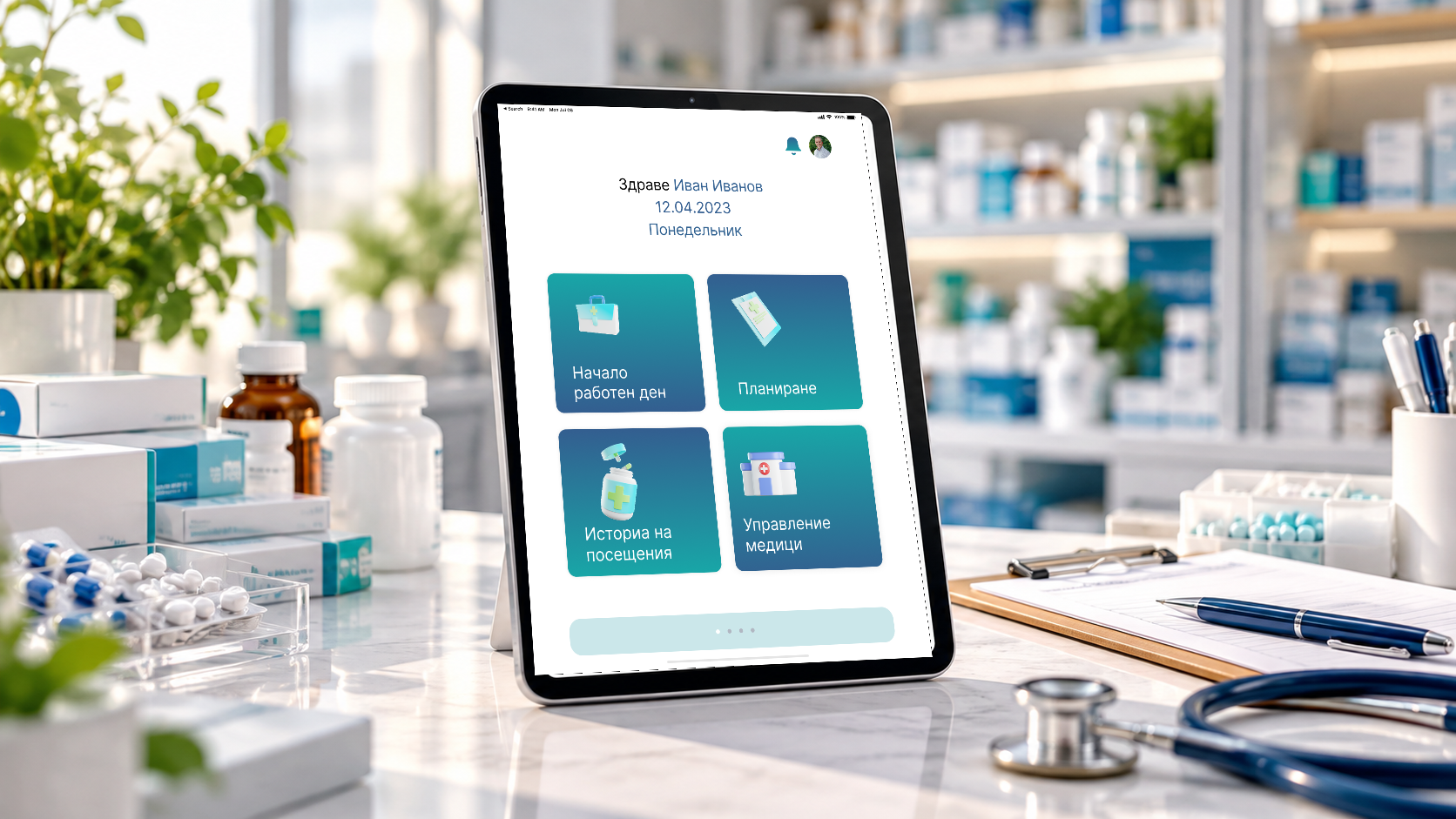
A tablet-based internal management platform designed for pharmacy managers to organize daily operations, plan pharmacy visits, manage pharmacies and medicines, and keep track of visit history.

As the Lead UX/UI Designer, I designed the tablet experience around complex operational workflows, focusing on clear navigation, efficient data management, and fast task completion. The product was designed specifically for tablet usage, with interfaces optimized for larger touch interactions and day-to-day managerial workflows.

Duration: 2 weeks Team: Solo Designer

Platform: Tablet  Status: Internal Platform

Project Goals

  • Simplify daily management workflows by bringing planning, visits, pharmacy management, and medicine management into one platform
  • Create a tablet-first experience optimized for touch interaction and larger-screen usage
  • Reduce cognitive load when working with schedules, pharmacies, medicines, and visit records
  • Make frequent actions faster through clear navigation and structured task flows
  • Create a scalable interface system that could support additional management functionality

Key Outcomes

  • Structured Management Dashboard: Created a central starting point for the manager’s daily activities, including planning, visit history, and medicine management.
  • Streamlined Visit Planning: Designed a structured workflow for creating, scheduling, and managing pharmacy visits across different dates and locations.
  • Efficient Data Management: Organized pharmacy and medicine information into clear tables and management views, making records easier to scan and update.
  • Task-Based Navigation: Grouped functionality around real managerial tasks rather than technical system categories, making the platform easier to understand.
  • Tablet-Optimized UX: Designed larger touch targets, spacious layouts, and simplified interactions specifically for tablet use.
  • Consistent Interaction System: Established reusable patterns for buttons, tables, dropdowns, forms, navigation, and modal interactions across the platform.

UX Decisions

This section is actually very important for this project because it demonstrates that you weren’t just creating screens.

Task-first architecture

The main navigation is organized around the manager’s actual daily activities — Planning, Visits, Visit History, and Medicine Management — rather than exposing the underlying system structure.

Progressive workflow

Complex actions such as adding a visit are broken into manageable steps instead of presenting every field at once. This helps managers complete operational tasks without being overwhelmed by information.

Information hierarchy

Tables and management screens prioritize the information needed for quick decisions — pharmacy, address, time, doctor/medicine, and available actions — while secondary information remains visually quieter.

Touch-first interaction

Because the product was required specifically for tablet, controls were designed with larger touch areas, generous spacing, and clear visual states rather than relying on desktop-style dense interfaces.

Contextual actions

Actions such as Add, View, Delete, Update, and Validate are positioned directly within the relevant workflow, reducing unnecessary navigation.

Operational continuity

The product supports the manager’s complete working cycle — from starting the day and planning visits to recording activities, reviewing history, managing medicines, and ending the working day.

My Contributions

  • Defined the information architecture and core navigation
  • Created user flows for planning and managing pharmacy visits
  • Designed the tablet-first UX and interaction patterns
  • Designed the management dashboard and operational workflows
  • Designed pharmacy and medicine management interfaces
  • Designed visit planning, visit history, and visit detail flows
  • Designed forms, tables, dropdowns, modals, and system states
  • Established the visual system including typography, colors, spacing, and components
  • Created reusable UI components and layouts in Figma
  • Prepared the final interface for development
banner-shape-1
banner-shape-1
object-3d-1
object-3d-2